


This post – What is Threat Modeling? – is the first in a series to educate those who are interested in a first experience with Threat Modeling.
What Is Threat Modeling? A Practical Guide for Security Teams
What is threat modeling? (definition)

Threat modeling is a structured process for identifying security threats to a system before they can be exploited – typically at the design stage, before code is written. It answers four questions: what are we building, what can go wrong, what will we do about it, and did we do a good job? Threat modeling methodologies like STRIDE, PASTA, and LINDDUN apply to IT systems, OT environments, IoT devices, AI models, and any other system with an attack surface. Catching a security flaw at design time costs roughly 100x less than fixing the same flaw in production (IBM System Sciences Institute).
Threat modeling is most valuable when applied early – ideally in the design phase of each significant feature, before implementation decisions are locked in. Security flaws found at design time cost a fraction of what they cost to fix in production. That said, threat modeling can also be applied to existing systems: a new threat model on a legacy architecture often uncovers risks that years of operation normalized into blind spots.
At Toreon, we run threat modeling as a collaborative workshop – bringing together system owners, architects, and developers to analyze the system together, typically using a whiteboard or a tool like Miro. This is sometimes called “whiteboard hacking”: you think like an attacker before writing a single line of production code. The workshop produces a data flow diagram, a list of threats categorized by a framework like STRIDE, and a prioritized set of mitigations.
How does threat modeling work? The 4-question framework
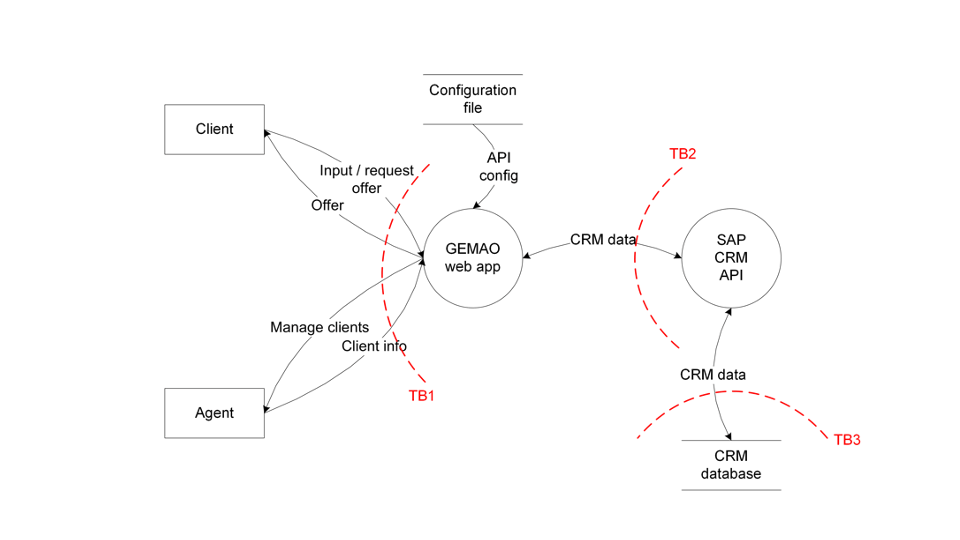
The Threat Modeling process is done in two phases, split into two workshops: data modeling and threat modeling.
First, during the data modeling phase, the system is analyzed and drawn out. All the connections and data flows are detailed in a diagram.
Special attention is given to the trust boundaries. These are points of interest where the level of security changes. They represent the attack surface of your system.
The second workshop focuses on threat modeling itself. A methodology for threat evaluation (such as STRIDE – more on STRIDE in another post) is used to create and categorize ‘worst case’ scenarios and analyze the potential impact.
While we use methodologies like STRIDE to categorize specific threats, the overall process is guided by four fundamental questions:
-
What are we building? We begin by mapping the system with a Data Flow Diagram (DFD). By identifying components, data flows, trust boundaries, and external entities, we create the necessary foundation for the entire analysis.
-
What can go wrong? Next, we apply a classification framework like STRIDE to the DFD. This allows us to systematically hunt for threats—including Spoofing, Tampering, Repudiation, Information Disclosure, Denial of Service, and Elevation of Privilege—across every component and flow.
-
What are we going to do about it? For every threat identified, we must define a clear mitigation strategy: eliminate, mitigate, transfer, or accept the risk. These decisions should be linked directly to your development backlog to ensure they aren’t forgotten.
-
Did we do a good job? Finally, we circle back to validate the model. We review whether the proposed mitigations actually address the identified threats and document any residual risk decisions for future audits.
What does a threat model produce? Outputs and documentation
A completed threat model typically produces three artifacts: (1) a data flow diagram showing the system architecture with trust boundaries labeled, (2) a threat register listing identified threats with their STRIDE category, severity, and mitigation status, and (3) a set of security requirements that can be added directly to the development backlog. These outputs serve double duty: they guide the development team and they provide documented evidence of security-by-design for CRA and NIS2 compliance audits.
A threat model is a living document: whenever the system is significantly changed – a new feature, a new integration, a cloud migration – the model should be updated. This “continuous threat modeling” approach is how threat modeling fits into agile development: rather than a one-time exercise, it becomes a recurring checkpoint at the start of each sprint or design phase.This way, the Threat Model becomes a useful piece of documentation to show and demonstrate the security considerations of an IT or OT system.
Threat modeling frameworks compared: STRIDE, PASTA, LINDDUN, MAESTRO and the Threat Modeling Manifesto
Several structured methodologies exist for threat modeling. The right choice depends on your system type, team experience, and whether your primary concern is security, privacy, or both.
STRIDE is the most widely used methodology, originally developed at Microsoft. The acronym maps to six threat categories: Spoofing (impersonating users or systems), Tampering (unauthorized modification of data or code), Repudiation (denying an action occurred), Information Disclosure (exposing sensitive data), Denial of Service (making a system unavailable), and Elevation of Privilege (gaining unauthorized access levels). STRIDE is applied systematically to each component and data flow in your diagram, making it difficult to miss a threat category. It is methodology-neutral – it works whether you are modeling a web application, an OT system, or a cloud-native microservices architecture.
LINDDUN is designed specifically for privacy threat modeling. Where STRIDE focuses on security, LINDDUN maps to seven privacy threat categories: Linking, Identifying, Non-repudiation, Detecting, Data Disclosure, Unawareness, and Non-compliance. If your system handles personal data and you need to demonstrate GDPR compliance, LINDDUN provides a structured way to identify privacy risks that STRIDE would miss.
PASTA (Process for Attack Simulation and Threat Analysis) is a seven-stage, risk-centric methodology that aligns threat modeling with business objectives. It is more involved than STRIDE but produces a risk-quantified output that maps directly to business impact – useful when you need to communicate findings to non-technical stakeholders or justify security investment.
The Threat Modeling Manifesto (2020), co-authored by Adam Shostack and other industry experts, provides a methodology-agnostic set of values and principles for threat modeling programs. It is not a step-by-step process but a set of guiding values – useful for organizations building a repeatable threat modeling practice across multiple teams.
With the rise of AI and agentic systems, STRIDE has been extended to cover machine learning and LLM-specific attack vectors. STRIDE for AI adds threat categories for prompt injection, model inversion, data poisoning, and training data extraction – threats that did not exist when the original STRIDE framework was designed. For agentic and multi-agent AI systems, a newer framework called MAESTRO is emerging to model orchestrator-level risks. If your system includes LLM components or ML models, read our guide to STRIDE for AI for the extended framework, or join our AI Whiteboard Hacking Training to practice the methodology hands-on.
Threat modeling tools: free and commercial options
Threat modeling is methodology-first; a whiteboard, a sticky note, or a Miro board is enough to run a productive session. As programs mature, dedicated tooling helps standardize diagrams and threat catalogs across teams.
The Microsoft Threat Modeling Tool is the longest-standing free option, focused on STRIDE analysis of Windows and Azure architectures. OWASP Threat Dragon is open-source, browser-based, and exports JSON threat models that fit into git workflows – a good choice for teams that want threat models living next to code.
For enterprises, commercial platforms like IriusRisk and ThreatModeler provide a threat library, automated diagram-to-threat suggestions, and integrations with Jira / Azure DevOps, so that mitigations flow into the existing backlog. They reduce the per-session time investment once a baseline architecture exists, but they do not replace the workshop format – the conversation is where the real value lives.
Which tool is right depends less on features and more on team rhythm. Teams new to threat modeling get the fastest ROI from Miro or a physical whiteboard; teams running threat models on dozens of features per quarter benefit from a dedicated platform that enforces consistency.
When to do threat modeling in your SDLC (and how often to update threat models)
Threat modeling delivers the highest return when it happens early – before architecture and technology choices are locked in. The design phase is the right moment: you can still change the architecture, choose different components, or redesign a data flow. Once code is written, the cost of changing security-relevant decisions increases dramatically. IBM’s System Sciences Institute estimates that a security flaw caught at design time costs roughly 100 times less to fix than the same flaw found in production.
In agile development, this means threat modeling at the start of a sprint when a significant feature is being designed – not at the end, when it is already built. A practical trigger: any feature that changes the system’s trust boundaries, introduces new external integrations, handles sensitive data, or changes authentication or authorization logic warrants a threat model. Cosmetic or content-only changes typically do not.
How long does a session take? For a focused feature, 90 to 120 minutes is typical with a team of four to six people. The first session on a new system takes longer (two to three hours) because the team needs to build the initial data flow diagram from scratch. Subsequent sessions for incremental changes are faster, especially once the team is familiar with the methodology.
How often should you update your threat models? A threat model is a living document. Revisit it whenever the system changes significantly: a new API integration, a cloud migration, a change in data retention policy, or a new user role. In practice, many teams review their core threat models annually and run lightweight session updates for individual features throughout the year.
For teams new to the process, our step-by-step guide to running a threat modeling session walks through the practical mechanics of each of the four questions in a single workshop.
Threat modeling vs. penetration testing: what is the difference?
Threat modeling and penetration testing are both security techniques – but they answer different questions at different points in the development lifecycle. Understanding the distinction helps you use both effectively rather than treating them as alternatives. The short version: threat modeling finds what should not exist in the design; penetration testing finds what slipped through in the implementation. The two are complementary, not competing.
Threat modeling happens at design time, before code is written. It is a collaborative, structured analysis of how a system could be attacked, based on its architecture and data flows. The output is a set of design decisions and security requirements that shape how the system is built. Threat modeling finds structural weaknesses – missing trust boundaries, over-privileged components, insecure data flows – that would take significant rework to fix if caught later.
Penetration testing happens after the system is built and deployed. A skilled attacker (ethical hacker) tries to exploit the implemented system. The output is a list of vulnerabilities found in the actual code, configuration, and infrastructure. Penetration testing validates whether the controls that were designed actually work in practice.
The key insight: threat modeling finds what should not exist in the design; penetration testing finds what slipped through in the implementation. A system that was threat modeled thoroughly will still benefit from a pentest – the two techniques are not competing but complementary. In fact, the threat model output is useful input for the penetration test: it tells the tester where the high-risk areas are and what the design was supposed to prevent.
A common mistake is to rely solely on penetration testing as a security assurance mechanism. Pentests find implementation bugs; they cannot retroactively fix architectural decisions made in the design phase. If the architecture is fundamentally insecure, no amount of patching will fully close the risk. Threat modeling is the only technique that can catch these architectural risks before they are built in.
Interested in how Toreon combines both techniques? Explore our threat modeling services or our ethical hacking practice.
Threat modeling and regulatory compliance: CRA, NIS2, and ISO 27001
For organizations operating in Europe, threat modeling has moved from a security best practice to a near-regulatory requirement. Three frameworks in particular make a direct case for documented threat analysis.
Cyber Resilience Act (CRA) – The EU Cyber Resilience Act, which applies to manufacturers of products with digital elements sold in the EU, requires manufacturers to demonstrate “security by design and by default” (Article 13(2)(a)).
The regulation does not prescribe a specific method, but a threat model is the most direct way to document that you analyzed security risks during the design phase, before the product was finalized.
When a market surveillance authority asks for evidence of security-by-design, you show them a threat model. The CRA’s requirements apply to a wide range of products: consumer IoT devices, industrial control systems, software products, and cloud-connected hardware.
If your organization builds any product with digital elements and sells it into the EU, threat modeling is effectively mandatory from a practical compliance standpoint.
NIS2 Directive – The NIS2 Directive (Article 21(2)(a)) requires essential and important entities to implement “policies on risk analysis and information system security” as a mandatory risk management measure.
Threat modeling is the most structured approach to implementing and documenting such a policy for IT systems and software. Organizations subject to NIS2 who cannot demonstrate systematic risk analysis face potential supervisory action and, for essential entities, management liability.
ISO 27001 – ISO 27001 Annex A includes controls for information security risk assessment and treatment (A.8.8, A.5.8) and security requirements for systems development (A.8.25).
Threat modeling provides documented evidence that these controls are implemented for software and system design activities. For organizations seeking or maintaining ISO 27001 certification, threat modeling sessions and their outputs (DFDs, threat registers, mitigation decisions) are strong evidence for auditors.
Toreon has worked with Belgian and European organizations across healthcare, finance, automotive, and the public sector to build threat modeling programs that satisfy CRA, NIS2, and ISO 27001 requirements simultaneously. Read our detailed guide on threat modeling as a path to CRA compliance for a practical walkthrough of what documentation to produce and how to structure it for auditors.
Threat modeling in practice: from training to backlog
The most common failure mode of threat modeling is not the analysis; it is what happens (or does not happen) after our threat modeling training. A threat register that lives in a one-off slide deck has no compounding value. A threat register that flows directly into the development backlog drives every sprint thereafter.
The practical workflow looks like this. The workshop produces a Data Flow Diagram, a STRIDE-categorized threat list, and a mitigation decision (eliminate, mitigate, transfer, or accept) for each threat. Each mitigation that requires development work becomes a ticket in your tracker, with the threat ID and DFD reference in the ticket description so the developer understands why the work matters. Tickets that resolve a threat are tagged ‘security-mitigation’ so they show up in security review dashboards.
Accepted risks – threats the team knowingly chose not to fix – are documented in a residual-risk register signed off by the system owner. This is the artifact CRA market surveillance authorities and NIS2 supervisors will ask for when they want evidence of security-by-design.
The DFD itself becomes a living document. Update it whenever the architecture changes; archive the previous version. After three to five iterations, the team has a security-decision audit trail that supports both internal incident response and external compliance reviews.
This post is part of our effort to bring Threat Modeling to a wider audience. We have a tradition of teaching Threat Modeling to experts, helping them execute it better. However, when speaking with security and IT professionals, we realized that not only do they not know how to Threat Model, many don’t even know why they should, what the benefits are, or how it all works.
Ready to move from reading about threat modeling to actually doing it?
Here you can find our Threat Modeling offering or our Threat Modeling training..
Our next blog is ‘9 benefits of Threat Modeling‘.